Keep evidence in the context of each visit.
A connected part of the Veritoo workflow, from preparation to reviewed reporting.
Evidence starts with the right instructions.
- Find the point by QR code or ID.
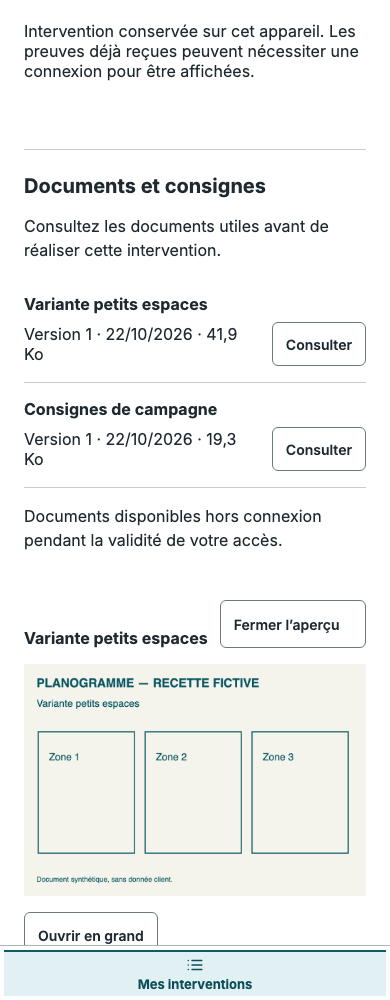
- Read the documents and variants for that point.
- Attach Before/After photos, outcome and issues to the visit.
An in-store rollout documented by employees
Head office shares a planogram and a variant for a smaller store. The invited employee reads the instructions, records Before/After conditions and flags a missing item. The network manager finds the evidence against the right point and reviews it.
Illustrative scenario, not a real client case.Prepare what needs recording
Campaign documents explain what is expected. Site or point variants capture the differences between locations.
Identify and document
Use QR codes or IDs, check the instructions, capture Before/After photos and declare the outcome or issue. Available location information adds context to the evidence.
Review before sharing
A manager checks the work before publishing the report. Photo presence alone does not constitute approval.
Frequently asked questions
Can we import a photo taken earlier?
Yes. Collection also supports importing photos. Coordinates in metadata may add context; an imported photo is not certified proof of presence.
Does missing location data block submission?
No. Available location adds context. When both the point and the photo have coordinates, a distant position can be flagged for review. Missing coordinates do not prevent submission.
Who reviews submitted evidence?
The manager reviews photos, outcomes and issues, then approves completed work. The account attributes a submission to an authenticated user; it does not by itself certify the content.
Explore related features
Veritoo is in beta.
Try it free for 14 days.
14 free days per organisation · By invitation after approval · No automatic paid conversion. Try it independently; we remain available if you have questions.